

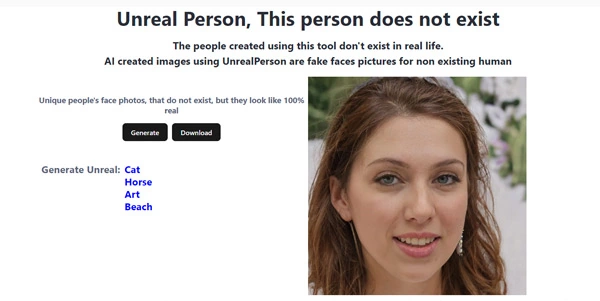
Using stock photos of real people can introduce licensing issues, GDPR privacy complications, and copyright fees. Unreal Person solves these issues by generating completely synthetic, photorealistic human faces that do not exist in the real world.
Quick Answer
Unreal Person is a free AI-powered face and portrait generator. It is ideal for UI/UX designers, developers, and game creators who need royalty-free profile pictures (avatars) or persona portraits. The primary use case is generating synthetic human faces, with the key advantage of offering instantly downloadable, copyright-free assets with zero usage restrictions.
Table of Contents
Full Introduction to Unreal Person
For decades, developers building applications had to pay for stock photo libraries or use placeholder sketches for user avatars. Unreal Person addresses this issue by generating highly realistic human faces utilizing generative adversarial networks (GANs).
Because the generated people are entirely artificial, there are no model release forms, copyright claims, or privacy issues associated with using them. It is a highly useful, lightweight tool in our list of the best AI face generator tools, offering an instant library of human portraits.
How Does Unreal Person Work?
Unreal Person uses Generative Adversarial Networks (specifically architectures based on StyleGAN). The system features two neural networks: a generator that creates synthetic face photos and a discriminator that audits the images against real photo datasets.
As the networks compete, the generator learns to output realistic details like skin pores, hair follicles, lighting reflections, and teeth. Every time a user requests an image, the model renders a completely new, unique face coordinate that has never existed before.
Key Features
- Instant Generation: Create a brand-new, realistic human face with a single click.
- Royalty-Free Assets: Downloaded images can be used for personal or commercial projects with no licensing fees.
- No Account Required: Generate and download portraits immediately without registration or login.
- Clean Interface: A minimalist web page built for rapid image downloading.
- High Resolution: Outputs clean portraits suitable for user avatars, mockups, and presentations.
Pros and Cons
Advantages
- 100% Free: Download as many faces as you need without credits or subscription plans.
- Legal Safety: No risk of copyright claims or privacy violations since the people are not real.
- Speed: Generates and loads new portrait variations in under a second.
Disadvantages
- No Custom Prompts: You cannot prompt for specific ages, genders, or ethnicities; generations are completely random.
- AI Artifacts: Backgrounds or ears can occasionally show minor asymmetry or warping (typical of GAN models).
Use Cases
UI/UX Design Mockups
Designers can populate user profile pages, testimonials, and contact cards in web mockups with realistic faces instead of default grey icons.
Game Development Avatars
Indie game developers can generate portraits for non-player characters (NPCs) or menu profiles without hiring concept artists.
Step-by-Step Tutorial
- Visit the Page: Navigate to the official Unreal Person website.
- Generate a Face: The site automatically generates a face upon loading. Click the shuffle icon to generate a new one.
- Check Details: Review the image for any AI artifacts (blurry ears, strange backgrounds).
- Download: Right-click the image and save it to your computer, or click the download button.
- Implement: Use the photo directly in your design templates or mockups.
Licensing and Pricing
Unreal Person is free, relying on advertising or cloud donations to keep servers running:
| Option | Cost | Details |
|---|---|---|
| Standard Download | Free ($0) | Unlimited generations, high-resolution downloads, commercial and personal license included. |
Price details may change over time. It is highly recommended to check the official website for latest updates.
Comparison with Competitors
| Feature | Unreal Person | Generated Photos | This Person Does Not Exist |
|---|---|---|---|
| Custom Filters | No (Random) | Yes (Age, Gender, Ethnicity) | No (Random) |
| Pricing Model | Free | Paid subscription / pay-per-image | Free |
| UI Style | Minimalist Web | Asset Store Portal | Image-only Refresh |
Who Should Use Unreal Person?
Who Should Use It?
Unreal Person is perfect for graphic designers, web developers building UI templates, authors needing character references, and presentations creators.
Who Shouldn’t Use It?
Users who require highly specific portraits with custom clothing, specific lighting angles, or targeted demographics should use paid, filtered generators.
Best Unreal Person Alternatives
- This Person Does Not Exist: The pioneer website that displays a new GAN face on every page refresh.
- Generated Photos: A paid platform that allows you to search and filter synthetic faces by age, gender, and skin tone.
- Midjourney: A general AI generator that can create specific portraits from text prompts.
Frequently Asked Questions
Are these faces really not of real people?
Yes. The faces are generated by neural networks from scratch. Any resemblance to a real person is purely coincidental.
Do I need to attribute Unreal Person when using the photos?
No attribution is required for standard use, but verifying their licensing page for specific project types is recommended.
Can I request a specific gender or age?
No, the site does not have filters. It generates a completely random face on every click.
Are the images safe for commercial work?
Yes, since the faces are synthetic and not copyrighted, they are safe to use in commercial advertising, web pages, and print layouts.
Why do some images have weird artifacts near the ears?
GAN models occasionally struggle to render symmetry in ears, glasses, and background elements, which is a common limitation of the technology.
Can I generate cartoon or anime faces?
Unreal Person is optimized specifically for photorealistic human portraits and does not generate cartoon characters.
What resolution are the downloaded files?
The standard downloads are typically saved as 1024×1024 pixel JPG files, which is ideal for user profile avatars.
How can I get a new face?
Simply click the “Refresh” or “Shuffle” button on the webpage, and the model will display a new face instantly.