

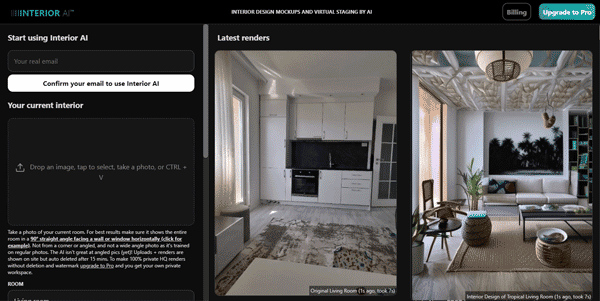
Redesigning room layouts and choosing color palettes often requires hiring expensive interior designers or struggling with complex 3D CAD modeling programs. Interior AI automates this process by transforming simple photos of your rooms into professional interior designs in seconds.
Quick Answer
Interior AI is an AI-powered interior design and virtual staging tool designed for real estate agents, homeowners, and interior architects. It is ideal for users who want to upload a photo of a room and generate design options in styles like modern, minimalist, or industrial. The primary use case is virtual staging and layout inspiration, with the key advantage of offering realistic lighting and perspective rendering without manual 3D modeling.
Table of Contents
Full Introduction to Interior AI
For home sellers and designers, empty or outdated rooms are a major hurdle to attracting buyers. Interior AI addresses this issue by using diffusion models trained on millions of interior design photos, allowing users to stage and style spaces virtually.
Users can select from over 30 design styles, specify the target room function (such as a bedroom, living room, or home office), and receive photorealistic renders. It is a leading platform in our category of best AI architecture tools and real estate aids, saving time on physical property staging.
This tool also fits well in our SuperTools categories.
How Does Interior AI Work?
Interior AI uses custom diffusion models optimized for spatial structures. When you upload a photo, the AI detects the wall coordinates, window placements, and floor lines to keep the room’s actual dimensions consistent.
The model then overlays new flooring, wall paint, furniture arrangements, and lighting fixtures according to your chosen style. It calculates realistic shadows and reflections, producing a high-fidelity render that feels like an actual photograph of a remodeled room.
Key Features
- Photo-to-Design: Upload a photo of any room and generate a complete interior remodel design.
- Virtual Staging Mode: Automatically detect empty spaces and populate them with furniture and decor.
- 30+ Interior Styles: Render rooms in popular aesthetics, including Mid-Century Modern, Industrial, Japandi, and Art Deco.
- Room Type Selection: Choose from kitchen, bathroom, bedroom, living room, office, and patio layouts.
- High-Resolution Renders: Export high-definition images suitable for listing websites and client presentations.
Pros and Cons
Advantages
- Drastic Cost Savings: Staging a home virtually is a fraction of the cost of physical furniture leasing.
- Incredible Speed: Generate new room ideas and layouts in less than ten seconds.
- Perspective Accuracy: Recognizes and maintains the camera angle and room dimensions of the input photo.
Disadvantages
- Furniture Precision: Generated furniture is synthetic; you cannot easily match the AI furniture to specific retail brands.
- Watermarked Free Outputs: The free tier limits generations and includes watermarks on downloaded images.
Use Cases
Real Estate Listings
Real estate agents can upload photos of empty houses and stage them virtually, making listings more appealing on sites like Zillow.
Home Renovation Inspiration
Homeowners planning a remodel can visualize how their living room looks with different flooring or wall colors before buying materials.
Step-by-Step Tutorial
- Take a Room Photo: Take a clear photo of your room facing a main wall (avoid wide-angle distortions).
- Upload the Image: Drag the photo into the Interior AI upload area.
- Select Room Type: Select the room category (e.g., Living Room) from the dropdown list.
- Choose a Style: Select a design theme like Minimalist or Modern.
- Generate: Click “Render” and wait for the AI model to output the newly styled room.
- Download: Save the high-definition design to your computer for reference.
Interior AI Pricing
Interior AI offers a freemium model with paid tiers unlocking high-res, private renders:
| Plan | Price | Features |
|---|---|---|
| Free Trial | Free | 5 monthly generations, watermarked images, public renders. |
| Pro | $29 / month | Unlimited renders, high-resolution outputs, private mode, commercial license, 30+ styles. |
| Pro Team | $299 / month | Colleague workspaces, API access, priority rendering speed, custom models support. |
Price details may change over time. It is highly recommended to check the official website for latest updates.
Comparison with Competitors
| Feature | Interior AI | REimagine Home | Planner 5D AI |
|---|---|---|---|
| Input Method | 2D Photo upload | 2D Photo upload | 3D Floor plan builder |
| Render Speed | Fast (< 10s) | Moderate | Slow (3D processing) |
| Core Specialty | Visual Staging | Exterior & Interior Staging | Interactive CAD Design |
Who Should Use Interior AI?
Who Should Use It?
Interior AI is perfect for real estate agents wanting to stage vacant properties, interior designers seeking mood board inspiration, and homeowners planning renovations.
Who Shouldn’t Use It?
General contractors or structural engineers who require technical blueprint measurements, structural load planning, or CAD blueprints.
Best Interior AI Alternatives
- REimagine Home: A similar AI-powered staging app that edits both interior spaces and outdoor landscapes.
- Homestyler: A comprehensive 3D interior design portal featuring catalog items from real brands.
- RoomGPT: A simple, open-source web tool for quick room color and styling redesigns.
Frequently Asked Questions
Can I upload empty room photos?
Yes, the virtual staging mode is designed specifically to detect empty walls and floors and fill them with furniture naturally.
Are the generated items real furniture brands?
No, the AI generates generic, stylistically consistent furniture assets, but you can find similar models in real retail stores.
Is there a commercial license included?
Yes, all renders created under a Pro or Team subscription include full commercial usage rights for marketing and listings.
How many styles does it offer?
The platform features over 30 design styles, including Scandinavian, Modern, Coastal, Vintage, and Art Nouveau.
Does it keep my room size accurate?
Yes, the spatial recognition algorithms detect wall edges and ceiling heights to ensure the generated layouts fit the room scale.
Can I edit specific parts of the room only?
Yes, Pro plans include brush mask tools to select and edit specific furniture pieces or paint only one wall.
Can I render outdoor yards?
While optimized for indoor rooms, the tool also includes styles for patios, terraces, and garden spaces.
Is there a mobile application?
Currently, Interior AI is hosted as a web application accessible via mobile and tablet browsers.