

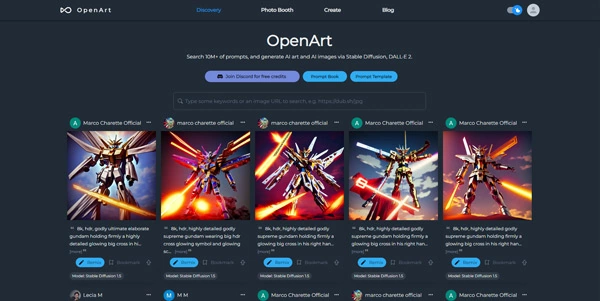
Finding the exact wording and settings to generate high-quality AI artwork can require hours of trial and error. Openart serves as a massive AI prompt database and image generator, helping artists discover inspiration and generate custom visual assets in their browser.
Quick Answer
Openart is an AI image search engine and creative art generation platform designed for digital artists, designers, and prompt developers. It is ideal for users who want to search millions of Midjourney, DALL-E, and Stable Diffusion prompts and create custom variations. The primary use case is prompt research and art generation, with the key advantage of offering specialized models (like Anime or Sketch-to-Image) with direct parameter control.
Table of Contents
Full Introduction to Openart
As diffusion models gained popularity, the biggest hurdle for creators was understanding how specific keywords, lighting tags, and seeds affected the output quality. Openart solved this problem by indexing over 15 million high-quality AI generations alongside their exact text prompts.
In addition to being a research database, Openart has grown into an all-in-one creation suite that lets users train custom models, upscale images, and perform advanced canvas edits. It is a highly popular utility in our directory of AI prompt helper tools, helping designers speed up their production times.
How Does Openart Work?
Openart crawls public AI art spaces to compile a searchable database. The system extracts the prompt text, seed settings, aspect ratios, and active models used to build each image.
When you query the database, the search results show matching images along with copy-to-clipboard options for prompts. The generator tab uses these prompts to render new variations on high-performance cloud GPUs, letting users adjust parameters like guidance scale and step count visually.
Key Features
- Prompt Search Database: Browse and copy settings from over 15 million pre-generated AI images.
- Specialized AI Models: Generate images using custom-tuned styles for anime, product design, and realism.
- Sketch-to-Image: Upload a basic sketch drawing, and let the AI render it into a complete digital painting.
- Advanced Canvas Editor: Perform outpainting (extending borders) and inpainting (editing elements) within the browser.
- Custom Model Training: Upload a few photos of yourself or a product to train a personalized AI style.
Pros and Cons
Advantages
- Massive Design Library: An excellent place to study prompt engineering and find style tags.
- Feature Rich: Combines search, generation, canvas editing, and model training in one site.
- Generous Free Trial: New users receive free generation credits upon registration.
Disadvantages
- UI Complexity: The density of sliders, models, and options can be overwhelming for beginners.
- Public Database: Images generated on free tiers are published to the public search index.
Use Cases
Character Concept Design
Game developers and writers can search for character tags, copy starting prompts, and generate variations to build model sheets.
Product Package Mockups
Designers can generate packaging layouts and product placements, applying sketch-to-image to turn rough drafts into client mockups.
Step-by-Step Tutorial
- Search prompts: Go to the Openart search tab and input a keyword (e.g., “cyberpunk character”).
- Review Settings: Click on an image to view its prompt, seed, model, and aspect ratio.
- Copy Prompt: Click the copy button to save the prompt text.
- Open Generator: Go to the “Create” tab and paste the prompt in the text area.
- Adjust Parameters: Select your target model, set the aspect ratio, and click “Generate.”
Openart Pricing
Openart operates on a credits-based subscription model with a free trial tier:
| Plan | Price | Features |
|---|---|---|
| Free Trial | Free ($0) | One-time free credits, standard generation speed, public images. |
| Starter | $9.99 / month | 5,000 credits per month, access to all models, image editing, faster queue. |
| Hobbyist | $19.99 / month | 10,000 credits per month, custom model training, unlimited slow generations. |
| Pro | $39.99 / month | 25,000 credits per month, team workspaces, priority queue, private generation mode. |
Price details may change over time. It is highly recommended to check the official website for latest updates.
Comparison with Competitors
| Feature | Openart | Civitai | Lexica.art |
|---|---|---|---|
| Primary Strengths | Editing tools & Search | Model files download | Clean UI & Realism |
| Inpainting / Outpainting | Yes (Advanced) | No | No |
| Model Training | Yes (Easy) | Yes (Technical) | No |
Who Should Use Openart?
Who Should Use It?
Openart is perfect for digital artists looking for prompt inspiration, graphic designers creating stock mockups, and hobbyists exploring stable diffusion parameters.
Who Shouldn’t Use It?
Users who only want a simple, one-click text-to-image chat bot without learning about sliders, seeds, or guidance scales.
Best Openart Alternatives
- Lexica.art: A highly popular Stable Diffusion search engine featuring a clean design and custom models.
- Civitai: The largest open-source hub for downloading custom diffusion checkpoints and LORAs.
- Leonardo.ai: A premier creative suite offering advanced canvas tools and game asset generation.
Frequently Asked Questions
Is Openart free to use?
Openart offers a limited free trial with initial credits to test the generator, after which paid credit packs or subscriptions are required.
Can I use Openart images commercially?
Yes. Images you generate on paid subscription plans include a full commercial license for marketing and print layouts.
What is Sketch-to-Image?
It is an AI feature that takes a uploaded rough sketch drawing and uses text prompts to transform it into a finished digital painting.
Can I keep my generated images private?
Private generation mode is available to premium subscribers. On the free tier, generations are published to the public search index.
What is a seed in AI art?
A seed is a starting numerical value that coordinates the random noise pattern of the diffusion model; using the same seed and prompt yields matching images.
Can I train my own AI models?
Yes. Under the Hobbyist and Pro plans, you can upload a set of photos to train a custom style model (e.g., your face or an art style).
Does it support Midjourney prompts?
Yes, the prompt database indexes millions of Midjourney designs, showing the exact prompt text used to build them.
How fast does Openart generate images?
Standard generations take about 5 to 10 seconds to compile, depending on the active server load and queue priority.