

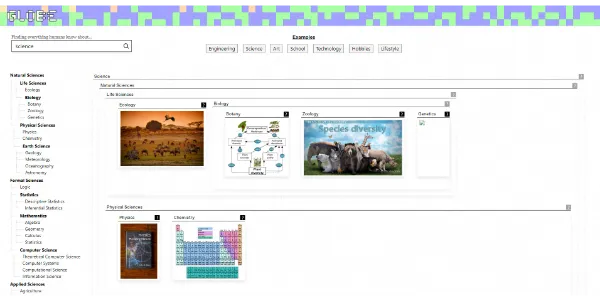
Researching new topics using standard search engines often requires scrolling through multiple blue links and filtering out ad spam. Globe Explorer AI addresses this by organizing search results into interactive, visual mind maps and structured information paths instantly.
Quick Answer
Globe Explorer AI is a visual search engine and knowledge mapping platform designed for students, researchers, and curious learners. It is ideal for users who want to visualize complex topics, structure study guides, and discover connections between concepts. The primary use case is structured search and mind mapping, with the key advantage of displaying information in hierarchically organized visual cards that update dynamically as you explore.
Table of Contents
Full Introduction to Globe Explorer AI
Traditional search engines present answers as a list of text snippets, leaving it up to the reader to construct the overall concept. Globe Explorer AI maps topics visually, placing main concepts at the center and branching out into sub-topics.
By pairing web search results with hierarchical structures, the platform makes learning visual and structured. It is a premier utility in our list of AI search engines, AI study tools, and SuperTools, changing how we research online.
How Does Globe Explorer AI Work?
Globe Explorer AI translates your search query into a core node. The backend AI model queries web indices, organizing the information into hierarchical folders and sub-nodes.
The frontend displays this hierarchy as a visual card map. Clicking on a sub-node expands it to reveal summaries, related images, and further sub-topics, allowing you to dive deep into a topic block by block without losing your place.
Key Features
- Visual Mind Mapping: Automatically structure search results into expandable visual card hierarchies.
- AI Summarization: Get brief, readable summaries for every folder and sub-node in the map.
- Interactive Discovery: Click sub-topics to expand the map dynamically, revealing deeper concepts.
- Image and Media Integration: Visual nodes are accompanied by related photos, diagrams, and illustrations.
- Personalized Boards: Save your generated maps to custom folders to build study plans.
Pros and Cons
Advantages
- Structured Learning: Excellent for understanding how sub-concepts link to the main topic.
- Fast Overview: Provides a comprehensive summary of complex topics in seconds.
- Visual Interface: Clean visual grids are far more engaging than lists of blue text links.
Disadvantages
- Deep Technical Research: May simplify complex topics too much, requiring manual verification of academic details.
- Credit Restrictions: Free accounts have limits on the depth and number of daily search expansions.
Use Cases
Academic Study Guides
Students can search for broad topics (e.g., “Quantum Mechanics”) to generate a complete visual map of sub-theories and histories.
Project Brainstorming
Project managers and designers can map out visual concepts, finding related branches to spark design ideas.
Step-by-Step Tutorial
- Search a Topic: Go to the Globe Explorer homepage and enter a query in the search bar.
- Review the Map: Look at the central cards and sub-folders generated by the AI.
- Expand Sub-nodes: Click on any sub-topic card to open it and expand its related branches.
- Read Summaries: Review the AI-generated text summary shown inside the expanded card panels.
- Save Board: Click the bookmark icon to save the map to your dashboard library.
Globe Explorer AI Pricing
Globe Explorer offers basic visual search for free, with paid options for unlimited mapping:
| Plan | Price | Features |
|---|---|---|
| Basic Account | Free ($0) | Standard visual search, basic map expansions, limited daily searches. |
| Premium Explorer | $9 / month | Unlimited searches, deep map expansion, ad-free access, export board options. |
Price details may change over time. It is highly recommended to check the official website for latest updates.
Comparison with Competitors
| Feature | Globe Explorer AI | Perplexity AI | Mindmeister |
|---|---|---|---|
| Layout Style | Visual Cards (Grid Map) | Chat Thread (Text-based) | Manual Mind Map Canvas |
| Source Search | Yes (Visual aggregation) | Yes (Citations lists) | No (Manual input) |
| Free Tier Value | Moderate (Usage caps) | Generous (Basic search) | Limited (3 maps limit) |
Who Should Use Globe Explorer AI?
Who Should Use It?
Globe Explorer AI is perfect for visual learners, university students structuring reports, researchers mapping new fields, and project brainstormers.
Who Shouldn’t Use It?
Users looking for conversational coding assistants, database scripting tools, or direct copy-paste copywriting platforms.
Best Globe Explorer AI Alternatives
- Perplexity AI: The leading conversational search engine that provides text answers with citations.
- Phind: An AI-powered search engine optimized specifically for software developers and coders.
- MindMeister: A popular collaborative mind mapping software for building diagrams manually.
Frequently Asked Questions
Is Globe Explorer AI free?
Yes. Globe Explorer offers a free basic plan that allows users to run standard visual searches and build basic maps.
How does the visual map update?
Clicking on any sub-topic folder triggers the AI to query relevant web content and append new branches to the map.
Can I export my boards?
Yes, paid subscribers can export their generated mind maps as PDF or image files for presentation slide decks.
What search engine does it use?
The platform aggregates results from multiple public web indexes and parses them using proprietary LLM structures.
Is it good for school projects?
Yes, it is highly popular among students to quickly structure presentation slides and understand topic hierarchies.
Can I collaborate with my team?
Yes, premium tiers allow you to share project folders and invite team members to view or edit search boards.
Does it support languages other than English?
Yes, you can input search queries in multiple languages, and the AI will translate and structure the map.
Who developed Globe Explorer AI?
It was developed by a team of visual data experts aiming to replace text-based search lists with intuitive graphics.