

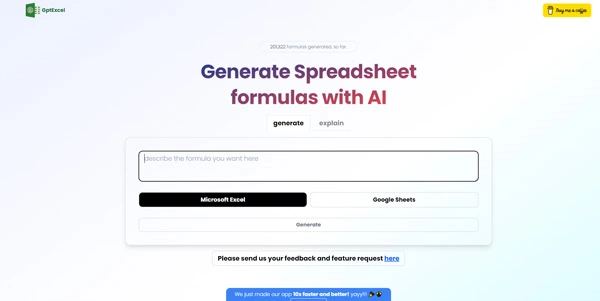
Writing complex formulas, scripts, or SQL queries in spreadsheets can be a major productivity bottleneck. GPTExcel uses advanced artificial intelligence to translate natural language prompts into working Excel formulas, Google Sheets formulas, and database scripts in seconds.
Quick Answer
GPTExcel is an AI-powered spreadsheet and scripting assistant designed for financial analysts, business operators, and database managers. It is ideal for users who want to write and explain formulas in Microsoft Excel or Google Sheets without memorizing complex syntax. The primary use case is automated formula generation, with the key advantage of also generating custom VBA scripts, Google Apps Scripts, and SQL database queries from plain text descriptions.
Table of Contents
Full Introduction to GPTExcel
For many professionals, utilizing nested IF statements, VLOOKUPs, or index-matching formulas requires hours of searching online tutorials. GPTExcel addresses this by integrating language models trained specifically on spreadsheet syntax and database scripting structures.
The platform allows users to input simple requests (e.g., “Calculate the average sales in column B if column C is ‘Completed'”) and outputs the exact formula code needed. It stands as a premier solution in our category of AI file and spreadsheet tools, making data analysis accessible to non-programmers.
This tool also fits well in our GPTs list categories.
How Does GPTExcel Work?
GPTExcel processes text prompts using natural language processing (NLP). When a user inputs a query, the AI maps the request parameters (columns, math logic, conditions) into structured spreadsheet functions.
The interface supports multiple databases and spreadsheet applications. Users can toggle between Excel formulas, Google Sheets formats, SQL queries, and VBA/Apps Scripts, ensuring that the generated code fits their target environment perfectly.
Key Features
- Formula Generator: Convert natural language instructions into working Excel and Google Sheets formulas.
- Formula Explainer: Paste a complex, nested formula and get a step-by-step breakdown of what it does.
- VBA & Apps Script Writer: Generate custom macro scripts to automate repetitive spreadsheet tasks.
- SQL Query Builder: Create database queries from plain text instructions matching standard SQL formats.
- Formula History: Keep track of your generated formulas and scripts in your user dashboard.
Pros and Cons
Advantages
- Highly Accurate: Generates complex spreadsheet logic and nested statements reliably.
- Saves Time: Eliminates the need to search help forums for VLOOKUP or regex syntax.
- Easy-to-use Interface: Clean visual toggles between Excel, Google Sheets, and SQL modes.
Disadvantages
- Cell Adjustments Required: Users must edit generated column/row references to match their sheet layouts.
- Free Limits: The free plan restricts the number of generations per day.
Use Cases
Financial Modeling
Analysts can generate complex depreciation, interest, or formatting formulas to build financial sheets faster.
Database Administration
Developers and managers can write SQL scripts to filter databases or create joins without writing raw code manually.
Step-by-Step Tutorial
- Open the Tool: Visit the official GPTExcel dashboard.
- Select Mode: Choose between Excel, Google Sheets, VBA, Apps Script, or SQL.
- Describe Your Goal: Type your request (e.g., “Find the sum of column A if column B matches ‘Paid'”).
- Generate: Click “Generate” to receive the formatted formula.
- Copy and Adjust: Copy the formula and adjust cell coordinates (like A1 to E5) to match your sheet.
GPTExcel Pricing
GPTExcel offers basic formula creation for free, with paid plans unlocking advanced scripting tools:
| Plan | Price | Features |
|---|---|---|
| Free | Free ($0) | 4 generations per day, basic formula generator, Excel & Google Sheets support. |
| Pro | $6.99 / month | Unlimited generations, VBA scripts, Google Apps Scripts, SQL queries, ad-free access. |
Price details may change over time. It is highly recommended to check the official website for latest updates.
Comparison with Competitors
| Feature | GPTExcel | Excel Formula Bot | Formula Dog |
|---|---|---|---|
| SQL Support | Yes (Pro plan) | Yes | Yes |
| VBA/Apps Script | Yes (Pro plan) | Yes | Yes |
| Monthly Price | Budget ($6.99) | Moderate ($9.00) | Premium ($12.00) |
Who Should Use GPTExcel?
Who Should Use It?
GPTExcel is perfect for accounting specialists, sales operations managers, database administrators, and students studying data analytics.
Who Shouldn’t Use It?
Casual users who only use spreadsheets for simple shopping lists and do not require logical formulas or data structures.
Best GPTExcel Alternatives
- Excel Formula Bot: A leading, feature-rich spreadsheet assistant with add-on integrations.
- Formula Bot: A popular tool that combines formula writing with data analysis bots.
- SheetGod: An AI tool that specializes in generating complex macros and spreadsheet regex.
Frequently Asked Questions
Is GPTExcel free to use?
Yes. GPTExcel offers a free tier that allows up to 4 formula generations per day without payment.
What is a VBA Script?
VBA (Visual Basic for Applications) is a programming language used inside Microsoft Excel to automate tasks, create menus, and build macros.
Can GPTExcel explain formulas I already have?
Yes. You can paste any complex formula into the “Explain” tab, and the AI will break down how each function behaves.
Does it support SQL?
Yes. The Pro plan includes a dedicated SQL builder that creates SELECT, JOIN, and UPDATE queries from text commands.
Will I need to adjust the generated formulas?
Yes. The AI uses placeholder cells (like A1, B1). You will need to replace these with your actual spreadsheet coordinates.
Is my data uploaded to the cloud?
Only the text prompts describing your formulas are sent to the AI; your actual spreadsheet files and values are not uploaded.
Does it support Google Apps Script?
Yes. The Pro plan can write Google Apps Script code to automate workflows and menus inside Google Sheets.
Who built GPTExcel?
GPTExcel was developed by a team of software engineers aiming to simplify data analytics using LLM capabilities.