

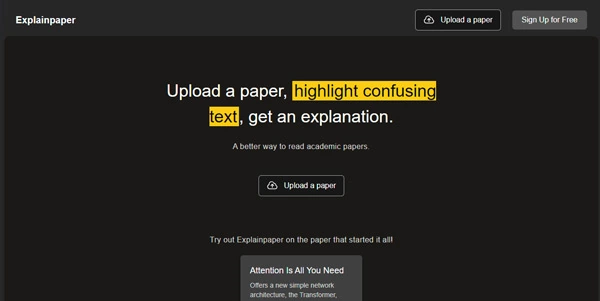
Reading academic literature can feel like translating a foreign language, especially when facing complex jargon. ExplainPaper acts as your personal academic assistant, explaining dense academic papers and highlighted sentences in simple, easy-to-understand terms.
Quick Answer
ExplainPaper is an AI-powered reading tool designed for students, researchers, and curious readers. It is ideal for users who want to quickly digest complex research papers without getting bogged down by academic jargon. The primary use case is explaining highlighted text and answering questions about uploaded PDFs, with the key advantage of providing clear, contextual explanations instantly.
Table of Contents
Full Introduction to ExplainPaper
For students and researchers, the volume of scientific literature published daily is overwhelming. ExplainPaper addresses this challenge by providing an interactive interface where users can upload complex PDFs and converse directly with the document.
Unlike generic AI assistants, ExplainPaper focuses purely on citation-backed comprehension. By allowing readers to highlight difficult jargon and receive instant explanations, it reduces cognitive load. It is one of the leading AI research tools built to simplify complex academic reading.
How Does ExplainPaper Work?
ExplainPaper processes uploaded academic papers by converting the text into readable vector embeddings. When a user highlights a passage, the AI searches the surrounding context of the document to explain the concepts clearly.
The system uses LLMs trained on academic databases, ensuring that technical jargon is explained with high precision. Users can ask follow-up questions, request summaries of specific chapters, or extract key methodology steps through the interactive chat interface.
Key Features
- Interactive Highlighting: Highlight any sentence or paragraph to get a simplified explanation.
- Document Chat: Ask questions directly to your PDF and receive answers with document citations.
- Custom Complexity Levels: Choose the target audience for explanations (e.g., “Explain like I am 5” or “Explain like a college student”).
- Highlight History: Save and review all your highlighted text and explanations for later study.
- Multi-Format PDF Support: Handles complex double-column academic papers, charts, and equations.
Pros and Cons
Advantages
- Accelerated Learning: Saves hours spent searching for definitions and terms.
- Simple Visual Interface: Clean double-pane design (paper on left, chat/explanations on right).
- Flexible Explanations: Adapts definitions to match the reader’s technical background.
Disadvantages
- Upload Limits: Free accounts have limits on document sizes and file upload counts.
- OCR Errors: Scanned, low-quality PDF files may experience minor text recognition issues.
Use Cases
Undergraduate Study Aid
Students can quickly review complex scientific journals for homework assignments without getting stuck on technical jargon.
Literature Review Acceleration
Researchers can scan new publications, highlight key methodology parts, and extract main conclusions faster than traditional reading methods.
Step-by-Step Tutorial
- Upload Your Paper: Drag and drop any academic PDF into the ExplainPaper dashboard.
- Highlight Text: Select any complex sentence or jargon with your cursor on the left pane.
- Read Explanations: View the simplified breakdown in the right pane instantly.
- Ask Questions: Type follow-up questions in the chat box to clarify methodology or results.
- Save Notes: Review your highlighted history and download summaries for study prep.
ExplainPaper Pricing
The service offers a robust free tier alongside professional plans for heavy researchers:
| Plan | Price | Features |
|---|---|---|
| Free | Free | Unlimited highlights, basic explanations, single file upload limit (up to 10MB). |
| Researcher | $9 / month | Unlimited uploads, priority support, advanced models, note export. |
| Professional | $19 / month | SSO, team folders, API access, largest file size support (up to 100MB). |
Price details may change over time. It is highly recommended to check the official website for latest updates.
Comparison with Competitors
| Feature | ExplainPaper | ChatPDF | SciSpace |
|---|---|---|---|
| Primary Feature | Highlight & Explain | General Document Chat | Literature Search + Chat |
| User Interface | Double Pane (Split Screen) | Chat Interface Only | Research Portal |
| Free Tier Limits | Very Generous | 3 PDFs / Day Limit | Credits System |
Who Should Use ExplainPaper?
Who Should Use It?
ExplainPaper is ideal for university students, science enthusiasts, research analysts, and developers reading complex tech papers.
Who Shouldn’t Use It?
Readers looking for general-purpose PDF editing, document signing, or forms filling tools should look for standard PDF editors.
Best ExplainPaper Alternatives
- ChatPDF: A popular, simple conversational interface for any PDF file.
- SciSpace: An end-to-end platform for researching, writing, and explaining literature.
- Consensus: An AI search engine that extracts answers directly from peer-reviewed research.
Frequently Asked Questions
Is ExplainPaper free to use?
Yes, ExplainPaper offers a generous free plan that includes unlimited highlights and basic explanations for academic documents.
Does it work with non-English papers?
Yes, the AI can read and explain papers in multiple languages, and can even explain English papers in your native language.
Can I upload books?
Yes, you can upload longer PDFs like textbooks on the paid plans which support larger file sizes.
How secure are my uploaded files?
ExplainPaper encrypts uploads and does not share your documents, but users should avoid uploading highly sensitive or proprietary corporate data.
Does it explain mathematical formulas?
Yes, the underlying model is trained on scientific symbols and can break down the logic of complex equations when highlighted.
Can I export my highlights?
Yes, paid plans support exporting your highlighted history and AI explanations to markdown or study tools like Notion.
Does it cite the sources of explanations?
Explanations are based directly on the uploaded paper, and the chat box cites specific pages and sections to prevent hallucinations.
What AI models does ExplainPaper use?
The platform utilizes advanced models like GPT-3.5 for standard users, with GPT-4 and custom academic fine-tuned models available on paid plans.