

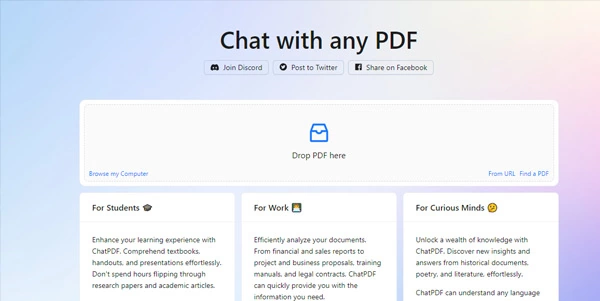
Reading lengthy textbooks, financial reports, or legal agreements can be incredibly tedious. ChatPDF uses advanced conversational AI to act as a document assistant, letting you ask questions and get instant, citation-backed answers directly from your PDF files.
Quick Answer
ChatPDF is an AI-powered document analysis tool designed for students, researchers, and project managers. It is ideal for users who want to upload PDF files and ask questions about their content in plain English. The primary use case is conversational PDF search, with the key advantage of providing direct page citations for every answer, allowing you to verify sources instantly without reading hundreds of pages.
Table of Contents
Full Introduction to ChatPDF
Locating specific clauses or definitions in massive PDF manuals has historically meant spamming Ctrl+F and scanning paragraphs manually. ChatPDF addresses this limitation by indexing the document and creating a conversational gateway.
With its simple drag-and-drop web interface, ChatPDF is one of the easiest tools to use. It has become a premier choice in our AI file and spreadsheet tools categories, and is a featured entry in our Digitechterra Selection for outstanding utility.
How Does ChatPDF Work?
ChatPDF processes uploaded files by extracting the raw text and splitting it into manageable semantic blocks. It uses vector embeddings to map these text segments in a multi-dimensional workspace.
When you ask a question, the AI locates the most relevant text segments in the PDF and uses large language models to construct a clear response. Crucially, the model appends the exact page numbers used to draft the response, helping you double-check the facts.
Key Features
- Document Chat Interface: Upload a PDF and ask questions to search the text conversationally.
- Page Citations: Every AI response includes clickable page citations linking back to the source text.
- Instant Document Summary: Automatically generates a brief overview and suggested questions upon upload.
- Multi-Language Support: Upload a paper in any language and ask questions in your native tongue.
- Cloud URL Support: Analyze PDFs hosted online by pasting their direct URL.
Pros and Cons
Advantages
- No Account Required: Start uploading and chatting immediately on the free plan.
- Factual Citations: Drastically reduces AI hallucinations by limiting responses to PDF context.
- Fast Indexing: Processes hundreds of pages of text in less than five seconds.
Disadvantages
- File Limitations: Free plans restrict the number of PDFs and total pages allowed per upload.
- Complex Graphics: Struggles to interpret maps, diagrams, or hand-drawn schematics inside documents.
Use Cases
Academic Research and Study
Students can upload textbooks or academic journals, using the chat to quickly extract definitions and study formulas.
This tool fits well in our AI study tools and business categories.
Corporate Document Auditing
Business analysts can upload annual financial reports or policy handbooks, asking ChatPDF to pull out specific budget details.
Step-by-Step Tutorial
- Upload PDF: Drag and drop any PDF file onto the ChatPDF homepage.
- Review Summary: Read the automated summary and sample questions generated by the AI.
- Ask a Question: Type a specific question (e.g., “What is the return policy details?”) in the input bar.
- Check Citations: Click the page references below the answer to highlight the source text.
- Export Chat: Export the conversation history as a text file for later study.
ChatPDF Pricing
ChatPDF offers a generous free tier with options to upgrade for larger files:
| Plan | Price | Features |
|---|---|---|
| Free | Free ($0) | Up to 2 PDFs per day, maximum 120 pages per PDF, 10MB limit, 20 questions/day. |
| Plus | $9 / month | Unlimited PDFs, up to 2,000 pages per PDF, 32MB limit, 1,000 questions/day, folder management. |
Price details may change over time. It is highly recommended to check the official website for latest updates.
Comparison with Competitors
| Feature | ChatPDF | Humata AI | ExplainPaper |
|---|---|---|---|
| Core Layout | Chat-centric | Double Pane (Split view) | Double Pane (Highlight focus) |
| Citations | Yes (Page numbers) | Yes (Text highlight) | Yes (Context-based) |
| Free Limits | 120 pages | 60 pages | Generous (Upload limits) |
Who Should Use ChatPDF?
Who Should Use It?
ChatPDF is perfect for undergraduate students, legal researchers reviewing contracts, finance professionals auditing reports, and casual PDF readers.
Who Shouldn’t Use It?
Users who require heavy editing tools (like text markup or document signing) or those analyzing highly classified corporate data.
Best ChatPDF Alternatives
- Humata AI: A powerful split-screen PDF reader that highlights source text inside the document.
- PDF.ai: A highly secure conversational platform with advanced document folder tools.
- ExplainPaper: Optimized for academic publications, allowing highlight-to-explain interactions.
Frequently Asked Questions
Is ChatPDF free to use?
Yes, ChatPDF allows you to upload 2 PDFs (up to 120 pages each) daily for free without registering.
Can ChatPDF read scanned PDFs?
Yes, if the PDF contains readable text layers. For completely flattened image scans, the results are less reliable.
Where is my PDF data stored?
ChatPDF encrypts all uploads and stores them in secure cloud storage. Files are automatically deleted after a period of inactivity.
Can I upload files from Google Drive?
Yes, you can paste direct public URL links of PDFs hosted on Google Drive or Dropbox to analyze them.
Does it support Excel or Word files?
ChatPDF is optimized for PDF files. To analyze DOCX or XLSX files, convert them to PDF format before uploading.
Can I ask questions in non-English languages?
Yes, the AI detects the language of your questions and translates the PDF data to respond in your target language.
What AI model powers ChatPDF?
The platform uses OpenAI’s advanced GPT-3.5 and GPT-4 models to extract context and draft conversational responses.
Is there an API available?
Yes, ChatPDF offers a developer API to integrate PDF chatting functionality into custom business applications.