

Animating static images into talking characters has traditionally required manual face-rigging, expensive motion capture suits, and 3D modeling skills. Expressive Photo Avatar uses generative AI models to animate single portrait photos into talking videos with realistic expressions.
Quick Answer
Expressive Photo Avatar is an AI-powered portrait animation tool designed for content creators, game developers, and marketers. It is ideal for users who want to upload a static face photo, import an audio track, and render a talking video. The primary use case is generating video avatars, with the key advantage of rendering expressive facial micro-movements, eye blinks, and natural head nods matching the input audio file.
Table of Contents
Full Introduction to Expressive Photo Avatar
Static profile pictures are becoming obsolete as social channels and educational sites transition to dynamic, talking avatars. Expressive Photo Avatar addresses this transition by using deep learning models trained specifically on human expressions and muscle movements.
By mapping voice audio to facial coordinates, the software syncs lip movements, blinking, and head rotations naturally. It is a highly useful platform in our directory of AI avatar tools and AI image generators, providing creators with a fast way to animate digital personas.
How Does it Work?
Expressive Photo Avatar uses face-mapping algorithms to detect key features (eyes, eyebrows, nose, mouth, and jawline) on an uploaded portrait photo.
When an audio track is added, the model analyzes the speech frequency, syllables, and emotion. The generative model morphs the static image in real time to match the mouth shapes (visemes) of the spoken words, while injecting random eye blinks and natural head movements to prevent a robotic look.
Key Features
- Photo Animation: Convert any static JPG or PNG face portrait into an animated talking video clip.
- Voice Sync: Automatically match lip movements to any uploaded MP3 audio file or voice recording.
- Expressive Micro-Movements: Generates realistic eye blinks, eyebrow movements, and natural head nods.
- Interactive WebUI: Simple browser-based editor that lets you drag, drop, and configure settings easily.
- High-Definition Outputs: Renders clean video files suitable for YouTube, TikTok, or presentation slide decks.
Pros and Cons
Advantages
- No 3D Models Needed: Animates flat 2D images directly without rebuilding them in 3D CAD software.
- Realistic Lip Sync: Syncs lip movements accurately to the pronunciation of spoken syllables.
- Fast Rendering: Compiles short talking videos in less than a minute.
Disadvantages
- Front-Facing Focus: Requires clear, front-facing portraits; angled or side-profile photos do not animate well.
- Complex Backgrounds: Highly detailed or messy backgrounds can warp during facial rotation.
Use Cases
Educational Video Presenters
Teachers and course builders can animate historical portraits (like Albert Einstein or Shakespeare) to read out educational lesson scripts.
Social Media Marketing Clips
Brands can create talking mascot videos to post product news updates on TikTok or Instagram without hiring actors.
Step-by-Step Tutorial
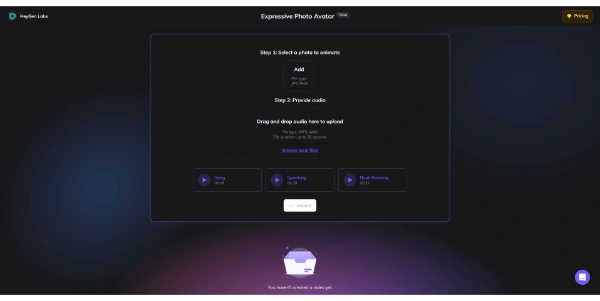
- Upload Photo: Drop a clear, front-facing face photo into the generator dashboard.
- Upload Audio: Import a pre-recorded voice track (MP3 or WAV format).
- Configure settings: Adjust sliders for expression intensity, head movement scale, and video resolution.
- Animate: Click “Generate” and wait for the model to render the talking video file.
- Download: Export the clip as an MP4 file to use in your editing software.
Licensing and Cost
Expressive Photo Avatar is available under freemium licensing options:
| Plan | Pricing | Features |
|---|---|---|
| Basic Free | Free ($0) | Limited daily video generations, standard resolution, includes watermark. |
| Creator Pro | $15 / month | Unlimited generations, high-definition (HD) renders, no watermark, commercial rights. |
Price details may change over time. It is highly recommended to check the official website for latest updates.
Comparison with Competitors
| Feature | Expressive Photo Avatar | D-ID | HeyGen |
|---|---|---|---|
| Expression Realism | High (Micro-expressions) | Moderate | Very High (Studio video) |
| Input Type | Photo + Audio | Photo + Audio/Text | Video / Custom Avatars |
| Ease of Use | Very High (One click) | High | Moderate (Video suite) |
Who Should Use Expressive Photo Avatar?
Who Should Use It?
It is perfect for online educators, video editors, social media creators, game designers building NPC dialogues, and presentation builders.
Who Shouldn’t Use It?
Users who require full-body character movement, hand gesturing, or photorealistic live actor interactions in long films.
Best Alternatives
- D-ID: A popular conversational avatar platform used for business and marketing videos.
- SadTalker: An open-source, code-level tool that generates talking heads from photos and audio.
- HeyGen: An enterprise-grade AI video generator specializing in photorealistic spokespeople.
Frequently Asked Questions
Is Expressive Photo Avatar free?
Yes. The platform offers a free plan with basic generations, requiring paid subscriptions for water-mark removal and HD exports.
What is a Viseme?
A viseme is the visual position of the mouth and face that corresponds to a spoken sound (phoneme).
Can I animate pet photos?
The model is trained specifically on human facial geometry; animating dog or cat faces yields poor, distorted results.
What audio formats are supported?
You can upload standard audio files, including MP3, WAV, and M4A, or record your voice live using the browser microphone.
Does it support text inputs?
Yes, paid tiers allow you to type a script and select a synthetic AI voice to read it instead of uploading audio.
Are the generated videos copyright-free?
Videos generated under the Creator Pro plan include full commercial rights and are free of copyright restrictions.
Why is the background warping?
Because the AI is turning a flat 2D image into 3D movement, complex backgrounds can warp slightly during head rotations. Using solid colors solves this.
Can I generate cartoon avatars?
Yes, you can upload hand-drawn character faces or anime portraits, though human photos yield the most realistic movement.