

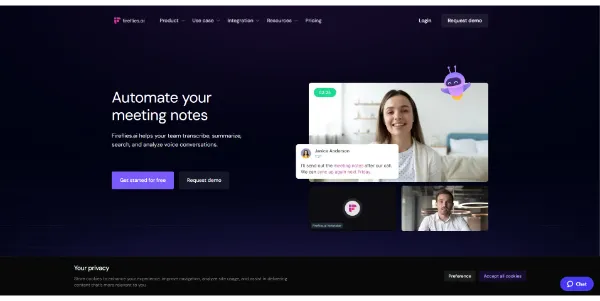
Taking notes during virtual meetings can be a major distraction from active collaboration. Fireflies.ai automates this process by recording, transcribing, and summarizing your meetings so you never miss an important decision.
Quick Answer
Fireflies.ai is an AI-powered meeting assistant and transcription tool designed for corporate teams, project managers, and recruiters. It is ideal for users who want to auto-join Zoom or Google Meet calls, generate action items, and search voice conversations. The primary use case is meeting transcription and analytics, with the key advantage of offering semantic search to locate specific topics or keywords in seconds.
Table of Contents
Full Introduction to Fireflies.ai
As remote work became the norm, teams found themselves spending hours writing post-meeting memos and action items. Fireflies.ai addresses this overhead by integrating directly with your calendar and recording video conferences automatically.
By applying specialized speech-to-text models, Fireflies translates multi-speaker audio into highly accurate text transcripts. It is recognized as one of the best AI transcription tools and productivity applications, letting teams focus on the conversation rather than administrative tracking.
How Does Fireflies.ai Work?
Fireflies.ai syncs with your Google or Outlook calendar. Once authorized, the Fireflies bot (Fred) automatically requests to join scheduled meetings on platforms like Zoom, Google Meet, Microsoft Teams, and Webex.
During the call, the bot records the audio and video. Within minutes after the meeting ends, the AI processes the recording to separate speakers, generate a complete transcript, compile a summary, and highlight actionable tasks.
Key Features
- Automatic Call Joiner: Integrates with calendars to automatically join, record, and transcribe meetings.
- AI Super Summaries: Generates bulleted key takeaways, action items, and topic outlines.
- Smart Search: Filter meetings by keywords, sentiment, question marks, speaker, or date.
- AskFred AI Assistant: A built-in chatbot that lets you ask questions about the meeting (e.g., “What was the budget proposal?”).
- CRM Integrations: Automatically sync meeting notes to platforms like Salesforce, HubSpot, and Slack.
Pros and Cons
Advantages
- Seamless Automation: Joins and records calls in the background without manual intervention.
- High Accuracy: Transcribes technical jargon and multiple speakers reliably.
- Powerful Search: Quickly find specific conversation segments without listening to hours of audio.
Disadvantages
- Bot Intrusion: Having an automated bot join calls can sometimes require guest approval or cause privacy concerns.
- Free Limits: The free tier has limited transcription credits and basic search functions.
Use Cases
Project Management
Project managers can track team updates, extract action items, and document project scope changes automatically after weekly sprint reviews.
Sales and Client Calls
Sales teams can record discovery calls, review client objections, and sync transcripts directly to their CRM for follow-up.
This tool also fits well in our summarizer and AI study tools categories.
Step-by-Step Tutorial
- Connect Your Calendar: Sign up and link your Google or Outlook calendar to the Fireflies dashboard.
- Set Autojoin Settings: Choose whether the bot should join all meetings, only those you host, or specific invites.
- Run Your Meeting: Host your Zoom or Google Meet call normally; the bot will request to join at the start.
- Review the Transcript: Open the “Notebook” tab in the dashboard after the call to view the transcript.
- Generate Action Items: Read the automated summary on the side panel to assign tasks to team members.
Fireflies.ai Pricing
Fireflies.ai offers a free tier for casual users alongside premium plans for teams:
| Plan | Price | Features |
|---|---|---|
| Free | Free ($0) | Limited transcription credits, basic summaries, Zoom/Meet integrations. |
| Pro | $10 / user / month | 8,000 minutes of storage, unlimited transcription, AI search filters, integrations. |
| Business | $19 / user / month | Unlimited storage, AskFred AI assistant, video screen capture, team templates. |
Price details may change over time. It is highly recommended to check the official website for latest updates.
Comparison with Competitors
| Feature | Fireflies.ai | Otter.ai | Fathom |
|---|---|---|---|
| Primary Focus | CRM Sync & AI Search | Real-Time Captions | Free Video Highlights |
| Integrations | Very High (CRM, API) | Moderate | Basic |
| Calendar Bot | Yes | Yes | Yes (Zoom native option) |
Who Should Use Fireflies.ai?
Who Should Use It?
Fireflies is perfect for sales managers, remote marketing agencies, project coordinators, and executive assistants who manage multiple meetings daily.
Who Shouldn’t Use It?
Users who host highly confidential calls, or those who prefer taking manual notes and do not require conversational databases, should avoid bots.
Best Fireflies.ai Alternatives
- Otter.ai: Best for real-time transcription and collaborative note-taking during live lectures.
- Fathom: A free Zoom/Meet assistant that provides instant video snippets and call transcripts.
- Read.ai: Focuses heavily on meeting metrics, attendee engagement analysis, and productivity scores.
Frequently Asked Questions
Does Fireflies record video?
Yes, on the Business and Enterprise plans, Fireflies records both the audio and video screen share of your meetings.
Is my data secure with Fireflies?
Fireflies complies with SOC 2 Type II and GDPR standards, encrypting all meeting data. You can delete recordings at any time.
Can I upload audio files?
Yes, you can upload MP3, WAV, or M4A audio files directly to the dashboard to transcribe pre-recorded calls.
What languages does Fireflies support?
Fireflies supports transcription in over 60 languages, including English, Spanish, French, German, and Portuguese.
Can I stop the bot during a meeting?
Yes, you can remove the bot from the call participant list at any time, or pause recording from the live meeting controls.
How long does it take to process a meeting?
A typical 1-hour meeting is fully transcribed and summarized in about 10 to 15 minutes after the call ends.
What is AskFred?
AskFred is an AI-powered chat assistant inside Fireflies that uses GPT models to answer questions about what happened in the meeting.
Does it integrate with Slack?
Yes, you can configure Fireflies to push meeting summaries and action items automatically to specific Slack channels.