

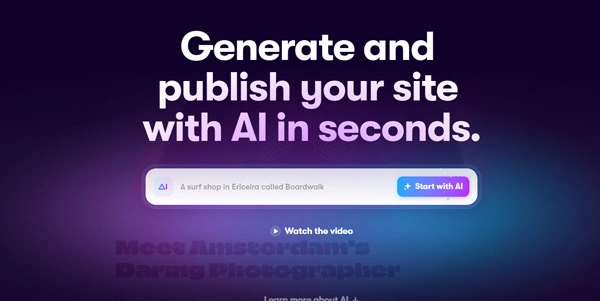
Building high-performance, visually stunning websites has typically required writing complex HTML, CSS, and JavaScript. Framer AI bridges the gap by letting you design and publish responsive web pages using simple natural language prompts.
Quick Answer
Framer AI is a no-code website design and publishing platform built for UI/UX designers, marketing teams, and developers. It is ideal for users who want to go from an idea to a fully responsive, animated webpage in seconds without writing code. The primary use case is automated landing page generation, with the key advantage of offering an incredibly powerful design canvas that allows pixel-perfect visual adjustments after the AI generates the page.
Table of Contents
Full Introduction to Framer AI
Framer originally gained popularity as an advanced prototyping tool for product designers, but its evolution into a website builder has disrupted the web design space. By introducing artificial intelligence into its editor, Framer allows users to generate entire pages, write copy, and select color themes instantly.
Unlike simple template generators, Framer AI builds layout components dynamically. Once generated, users can make full use of Framer’s professional design canvas, adding scroll animations, responsive breakpoints, and rich interactions. It is one of the premier platforms in our directory of no-code AI tools, enabling faster web development.
How Does Framer AI Work?
Framer AI takes your text prompt (e.g., “Create a dark landing page for a SaaS app with pricing cards”) and generates page layouts. The model determines color palettes, selects matching typography, and drafts the marketing copy.
The builder outputs a responsive page structured for desktop, tablet, and mobile breakpoints simultaneously. Designers can select specific blocks and regenerate them, change style themes with a click, or use the visual editor to fine-tune the layout manually.
Key Features
- AI Website Generator: Build complete, responsive landing pages from single text prompts.
- AI Copywriting: Automatically generate headlines, descriptions, and call-to-actions, or rewrite existing copy using AI.
- Dynamic Breaks: The generator builds desktop, tablet, and mobile views together, ensuring responsive layouts.
- Interactive Animations: Add hover states, page transition effects, and scroll-linked animations without code.
- Figma Integration: Copy layers directly from Figma and paste them into Framer to speed up production.
Pros and Cons
Advantages
- Outstanding Design Quality: Generated pages look modern, professional, and visually engaging.
- Fast Page Deployment: Build and publish a landing page online in under five minutes.
- Figma Import: Easily migrate design systems from Figma directly to the live web editor.
Disadvantages
- Limited Complex Backend: Not suited for heavy database-driven sites or complex e-commerce checkouts.
- Learning Curve: The design canvas offers professional tools (like flexbox/grids) that require basic layout understanding.
Use Cases
SaaS Product Landing Pages
Marketing teams can rapidly test and deploy product landing pages, capturing leads and tracking sign-ups easily.
Portfolio Websites
Creative designers and developers can build elegant visual portfolios to showcase projects with smooth animations.
This tool also fits well in our Websites & Design categories.
Step-by-Step Tutorial
- Start a New Project: Log in and open a blank canvas in the Framer dashboard.
- Launch Framer AI: Click “Start with AI” to open the prompt window.
- Describe Your Site: Type a detailed prompt describing your business, style, and goals.
- Customize Themes: Click the shuffle icon to cycle through different color schemes and font sets.
- Refine Manually: Edit the generated text, replace images, and configure links in the visual panel.
- Publish: Click “Publish” to deploy the website instantly on a free Framer domain or your custom domain.
Framer AI Pricing
Building is free, with subscriptions required to publish websites on custom domains:
| Plan | Price | Features |
|---|---|---|
| Free | Free ($0) | Framer banner, standard templates, publish on a .framer.ai subdomain. |
| Mini | $5 / month | Custom domain support, up to 1,000 visitors per month, 1 active landing page. |
| Basic | $15 / month | Custom domain, up to 10,000 visitors, simple CMS (up to 1,000 items), search. |
| Pro | $30 / month | Up to 200,000 visitors, unlimited CMS items, redirect support, advanced analytics. |
Price details may change over time. It is highly recommended to check the official website for latest updates.
Comparison with Competitors
| Feature | Framer AI | Webflow | Wix ADI |
|---|---|---|---|
| Design Freedom | Very High (Canvas-based) | Extreme (HTML/CSS control) | Low (Block-based) |
| Animation Engine | Outstanding (Spring physics) | Excellent | Basic |
| AI Generation | Excellent (Visual + Copy) | Basic (Text assistance) | Moderate |
Who Should Use Framer AI?
Who Should Use It?
Framer AI is perfect for UI/UX designers, marketing agencies, growth hackers, and startup founders who need beautiful, high-performance landing pages fast.
Who Shouldn’t Use It?
Developers who need complete access to raw codebases, or teams building massive e-commerce networks or database-driven forums, should look elsewhere.
Best Framer AI Alternatives
- Webflow: The industry standard for production-grade websites with deep code configuration.
- Gamma App: A great alternative for drafting presentation-style landing pages quickly.
- Typedream: A simple, database-connected no-code site builder.
Frequently Asked Questions
Can I download the code for my Framer website?
No, Framer does not support exporting HTML/CSS code directly. Sites must be hosted and published on Framer’s infrastructure.
Is Framer AI good for SEO?
Yes. Framer generates clean semantic markup, features fast server-side rendering, and provides custom controls for title tags, meta descriptions, and sitemaps.
Can I connect a custom domain for free?
No, custom domain support requires upgrading to a paid tier (Mini, Basic, or Pro plans).
Does Framer support CMS databases?
Yes, the Basic and Pro plans include a built-in Content Management System (CMS) for managing blog posts, portfolio projects, and events.
Can I import Figma designs?
Yes. You can copy layers or frames in Figma and paste them directly into the Framer canvas using the official Framer plugin.
Is Framer AI free to design?
Yes, you can build, customize, and edit your website for free. You only pay when you publish to a custom domain or need advanced CMS features.
Can I build web apps with Framer?
Framer is optimized for static websites, marketing hubs, and blogs. For complex web apps with user authentication or transactions, Webflow or native code is preferred.
Does it support responsive breakpoints automatically?
Yes, the AI generator builds layout scales for desktop, tablet, and mobile views simultaneously, reducing manual styling work.