

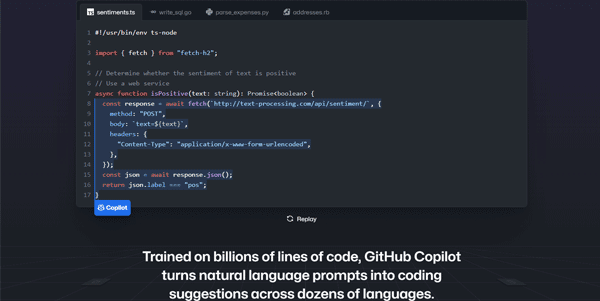
Writing code is becoming faster and more efficient thanks to generative autocomplete systems. GitHub Copilot integrates directly into your code editor to act as an AI pair programmer, suggesting lines of code and complete functions in real time.
Quick Answer
GitHub Copilot is an AI-powered coding assistant developed by GitHub and OpenAI. It is designed for software developers, engineers, and coding students who want to accelerate writing code. The primary use case is inline code autocompletion and logic generation, with the key advantage of learning from your active workspace to provide highly contextual code suggestions.
Table of Contents
Full Introduction to GitHub Copilot
For years, developers spent substantial time referencing API documentation, copying code structures from forums, and writing repetitive boilerplate code. GitHub Copilot addresses this by bringing a massive dataset of public code directly to your cursor.
Copilot supports dozens of programming languages and integrates seamlessly with popular IDEs like VS Code, JetBrains, and Neovim. It stands as the leading utility in the category of AI coding assistants, fundamentally changing the daily workflows of modern software developers.
How Does GitHub Copilot Work?
GitHub Copilot is powered by advanced language models fine-tuned on billions of lines of public code, including open-source projects hosted on GitHub.
As you type, the tool analyzes the active file, surrounding files, and open tabs to understand your code structure. It predicts what you want to write next and offers suggestions. You can accept a suggestion by pressing the tab key or cycling through alternative suggestions.
Key Features
- Inline Autocomplete: Get real-time suggestions for single lines, functions, or complete algorithms.
- Chat Interface: Converse with Copilot Chat directly in your editor to debug, refactor, or explain code.
- Docstring Conversion: Write a descriptive comment, and Copilot will automatically generate matching code logic.
- Test Case Generator: Highlight a function to automatically write unit test suites in your target framework.
- Multi-IDE Support: Seamless integration plugins for VS Code, Visual Studio, Neovim, and JetBrains IDEs.
Pros and Cons
Advantages
- Drastic Speed Boost: Saves time writing repetitive boilerplate and template code.
- Excellent Context Awareness: Suggests code that matches your existing variables and naming patterns.
- Language Versatility: Works well with JavaScript, Python, TypeScript, Ruby, Go, C++, and many others.
Disadvantages
- Validation Required: Suggestions can contain syntax errors, security vulnerabilities, or logical bugs that must be reviewed.
- Code Duplication Risk: May occasionally suggest code matching public projects, requiring careful license audits.
Use Cases
Boilerplate Generation
Quickly generate database connections, model structures, API endpoints, and configuration files without writing them from scratch.
Code Refactoring and Optimization
Use Copilot Chat to review legacy code and suggest modern, optimized syntax patterns to improve execution speeds.
This tool also fits well in our top AI trends categories.
Step-by-Step Tutorial
- Install Extension: Open your IDE (e.g., VS Code) and search for the GitHub Copilot extension.
- Authenticate Account: Sign in with your GitHub account containing an active Copilot subscription.
- Write a Comment: In a new file, write a comment like `// Function to calculate average` and press Enter.
- Accept Suggestions: Review the grey ghost text suggested by Copilot, and press Tab to accept it.
- Use Chat: Open the sidebar chat panel to ask questions like “How do I optimize this loop?”
GitHub Copilot Pricing
GitHub Copilot is available under subscription tiers with free access for verified students:
| Plan | Price | Features |
|---|---|---|
| Individual | $10 / month ($100/yr) | Full editor integrations, inline suggestions, Copilot Chat access. Free for verified students. |
| Business | $19 / user / month | Team management, license management, corporate IP protection filters, support. |
| Enterprise | $39 / user / month | Custom indexing for private codebases, custom fine-tuning options, fine-grained access policies. |
Price details may change over time. It is highly recommended to check the official website for latest updates.
Comparison with Competitors
| Feature | GitHub Copilot | Tabnine | Amazon CodeWhisperer |
|---|---|---|---|
| Context Window | High (Workspace indexing) | Moderate (Active file) | Moderate |
| Pricing Model | Paid Subscription | Freemium | Free Tier / Paid |
| IDE Support | VS Code, JetBrains, Vim | Wide IDE coverage | VS Code, AWS Cloud9 |
Who Should Use GitHub Copilot?
Who Should Use It?
GitHub Copilot is perfect for professional software developers looking to boost efficiency, and engineering students looking to study code structure examples.
Who Shouldn’t Use It?
Total beginners who have not learned programming logic should avoid it, as relying on automated suggestions can hinder learning fundamental coding rules.
Best GitHub Copilot Alternatives
- Cursor: An AI-first code editor built as a fork of VS Code with deep model integrations.
- Amazon Q Developer: AWS’s AI coding assistant optimized for cloud development and operations.
- Codeium: A free-for-individuals AI coding assistant with wide IDE support and fast autocomplete.
Frequently Asked Questions
Is GitHub Copilot free for students?
Yes, verified students, teachers, and maintainers of popular open-source projects can apply for free access to Copilot Individual.
Can Copilot write my entire application?
No. Copilot excels at writing small logical units and templates, but constructing overall system architecture requires human engineering.
Does Copilot use my private code to train its models?
For Business and Enterprise plans, GitHub states they do not retain or train models on your private repository data. Check their privacy settings to opt-out on Individual plans.
What languages does Copilot know?
It is trained on all public code databases, meaning it knows almost all programming languages, but performs best on JavaScript, Python, TypeScript, and Go.
Can I use GitHub Copilot offline?
No, the extension requires an active internet connection to communicate with GitHub’s cloud-based AI models.
Does Copilot replace human developers?
No. It acts as an assistant to reduce repetitive typing, allowing developers to focus on higher-level system architecture and problem-solving.
How do I cycle through alternative suggestions?
In VS Code, you can press Alt + [ or Alt + ] to view alternative ghost text completions before accepting.
What is Copilot Chat?
Copilot Chat is a sidebar interface in your editor that allows you to converse with the AI model about your code without copying and pasting.