

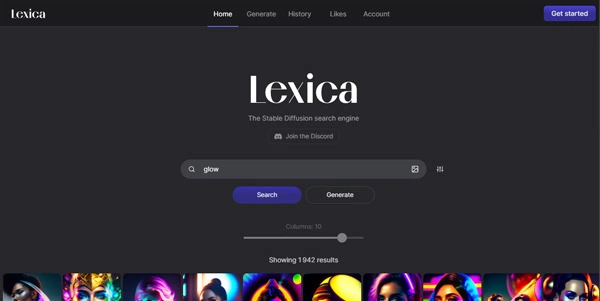
Finding the perfect prompt for text-to-image generators often requires extensive trial and error. Lexica.art serves as a massive Stable Diffusion search engine and image creator, helping artists find prompt inspiration and generate custom artwork instantly.
Quick Answer
Lexica.art is an AI image search engine and art generation platform designed for digital artists, designers, and prompt engineers. It is ideal for users who want to search millions of pre-generated Stable Diffusion images and extract their exact text prompts. The primary use case is discovering prompt patterns, with the main benefit of allowing users to generate high-quality variations of found images directly in their browser.
Table of Contents
Full Introduction to Lexica.art
As diffusion models gained popularity, the biggest challenge for creators was “prompt engineering” — finding the exact wording, style tags, and parameters needed to generate high-quality images. Lexica.art solved this by indexing millions of Stable Diffusion generations and making them searchable.
In addition to being a search index, Lexica has developed its own custom model, Lexica Aperture, which is optimized for photorealistic portraits, digital paintings, and cinematic scenes. It is one of the most popular platforms in our directory of AI image generators, acting as both an archive and a creation suite.
How Does Lexica.art Work?
Lexica.art indexes images by extracting their prompt text, seed numbers, classifier-free guidance (CFG) scale, and model versions. When you search for a term, the platform returns a grid of matching images alongside the exact prompt used to create them.
To generate new images, users type a prompt or upload a reference photo in the creator module. Lexica’s cloud GPU servers render four variations in seconds, allowing you to tweak prompts or explore similar concepts visually.
Key Features
- Prompt Search Engine: Search millions of AI images to view prompts, seeds, and dimensions.
- Lexica Aperture Model: Create photorealistic and artistic images using Lexica’s custom-tuned model.
- Image-to-Image Generation: Upload a reference image to guide the composition and style of new outputs.
- Negative Prompts: Specify elements you want to exclude from the generated image (e.g., “blurry, duplicate limbs”).
- History Dashboard: Keep track of your generated images and favorite prompt sets.
Pros and Cons
Advantages
- Massive Prompt Archive: Learn prompt engineering by studying what works for other creators.
- Highly Realistic Output: The Aperture model excels at rendering faces, lighting, and textures.
- User Friendly: Simplifies complex Stable Diffusion settings into an easy web interface.
Disadvantages
- Public Creations: Unless subscribed to a premium plan, all your generated images are visible in the public database.
- Free Limits: Free accounts have monthly generation limits and slower rendering speeds.
Use Cases
Design Mockups and Concept Art
Graphic designers can search for style tags (e.g., “minimalist logo, vector, flat design”) to find layouts and generate concepts rapidly.
Prompt Engineering Study
AI hobbyists can copy complex prompts from Lexica to learn how specific tokens, artist names, and camera models affect the output.
Step-by-Step Tutorial
- Search for Inspiration: Type a keyword (e.g., “cyberpunk cat”) into the Lexica search bar.
- Copy a Prompt: Click on an image you like to view its prompt, seed, and settings, then copy the text.
- Open the Editor: Navigate to the “Generate” tab at the top of the page.
- Input Your Prompt: Paste the copied prompt and adjust the text to make it your own.
- Adjust Dimensions: Drag the slider to set your target aspect ratio.
- Generate: Click “Generate” to view four original variations in seconds.
Lexica.art Pricing
Lexica offers a limited free tier alongside monthly subscriptions for heavy generators:
| Plan | Price | Features |
|---|---|---|
| Free | Free | 100 image generations per month, public search access, standard rendering speed. |
| Starter | $10 / month | Up to 1,000 fast generations per month, commercial license. |
| Pro | $30 / month | Up to 3,000 fast generations per month, unlimited slow generations, commercial license. |
| Max | $60 / month | Up to 7,000 fast generations per month, unlimited slow generations, private search option. |
Price details may change over time. It is highly recommended to check the official website for latest updates.
Comparison with Competitors
| Feature | Lexica.art | Midjourney | Civitai |
|---|---|---|---|
| Interface | Web Browser (Easy) | Discord App | Web Portal (Technical) |
| Prompt Search | Excellent (Built-in) | Limited web gallery | Excellent (Community focus) | Freemium ($10+) | Paid Only ($10+) | Free (Model sharing) |
Who Should Use Lexica.art?
Who Should Use It?
Lexica is ideal for digital illustrators, web designers needing stock assets, game developers creating textures, and prompt engineers looking for a clean search archive.
Who Shouldn’t Use It?
Users who require highly precise vector editing tools, or those who need absolute privacy for their generations without paying for high-tier plans, should look elsewhere.
Best Lexica.art Alternatives
- Midjourney: Currently the industry leader for high-fidelity artistic AI images.
- Leonardo.ai: A feature-rich creation platform that excels at gaming assets and textures.
- Civitai: A massive open-source hub for downloading custom Stable Diffusion models and checking community prompts.
This tool also fits well in our prompt aids categories.
Frequently Asked Questions
Can I use Lexica.art images commercially?
Images generated on paid plans include a commercial license. Images downloaded from the search engine generated by other users are subject to standard copyright guidelines.
What is the Aperture model?
Lexica Aperture is a custom fine-tuned model developed by Lexica, built on top of Stable Diffusion to produce highly detailed, photorealistic images.
Is there a limit on free searches?
No, you can search and browse the millions of indexed images in the Lexica database for free without limits.
Can I keep my generated images private?
Yes, but private mode is only available on the Max plan ($60/month). On lower tiers, your generations are published in the public search archive.
Does Lexica support image-to-image?
Yes, you can upload an image in the generator tab, and the AI will use it as a reference for color, layout, and style.
Can I download the raw model weights?
No, the Lexica Aperture model is proprietary and runs exclusively on Lexica’s cloud servers.
Does it support outpainting or inpainting?
Lexica focuses on image generation and prompt search, and does not natively support advanced canvas edits like outpainting or mask-based inpainting.
How many images are generated per prompt?
Every generation run in Lexica creates four distinct variations for you to choose from.