

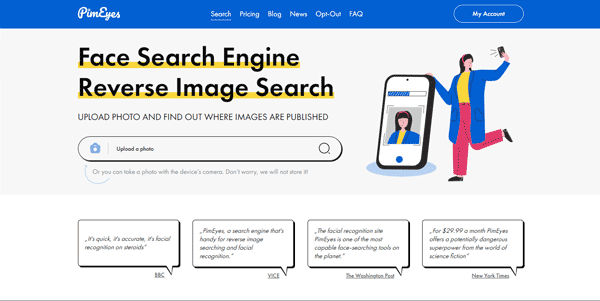
Finding where your face appears online is critical for managing your digital footprint and privacy. PimEyes is a state-of-the-art face search engine that scans the public web to identify websites hosting your photos.
Quick Answer
PimEyes is a facial recognition search engine designed for individuals, security professionals, and privacy advocates. It is ideal for users who want to audit their online presence, find unauthorized photo usage, and locate potential identity theft. The primary use case is reverse image search using face templates, with the key advantage of providing links to source websites where matching faces are found.
Table of Contents
Full Introduction to PimEyes
Managing online privacy has become incredibly difficult in the age of social media scraping. PimEyes addresses this issue by providing a public, AI-driven facial recognition index that searches websites, blogs, and public forums.
Instead of matching the metadata of an image, PimEyes analyzes the actual geometric features of the face. This allows it to locate matching faces even in photos with different lighting, backgrounds, or angles. It is a powerful tool in the ecosystem of AI detection tools and privacy utilities, giving users a way to monitor unauthorized media distribution.
How Does PimEyes Work?
PimEyes uses deep learning models to convert a face photo into a numerical feature template. When a user uploads a photo, the engine compares this template against billions of web pages indexed in their facial database.
The search algorithm focuses on matching structural parameters (such as the distance between eyes, nose bridge length, and jawline angles). The results list all matching photos found on public servers, accompanied by a direct link to the hosting site.
Key Features
- Facial Reverse Image Search: Upload a photo to find matching faces across the internet.
- Direct Source Links: Locate the exact web pages hosting the matching images.
- PimEyes Alerts: Set up automated daily monitors that alert you when new photos matching your face are indexed.
- DMCA Takedown Assistance: Access pre-written legal templates to request websites remove your photos.
- Deep Search Option: Run intensive searches that scan deeper levels of the public web.
Pros and Cons
Advantages
- Incredible Accuracy: Finds matching faces even when the photo is blurry, angled, or from years ago.
- Speed: Delivers search results in a matter of seconds.
- Privacy Management: Helps users identify and request removal of sensitive images.
Disadvantages
- High Pricing: Subscriptions are expensive, especially for accessing direct source URLs.
- Scraping Ethics: The indexing of public faces has raised ongoing privacy debates globally.
Use Cases
Identity Theft Audit
Users can check if catfishes or scammers are using their photos to create fake profiles on forums or matching platforms.
Copyright Violation Monitoring
Professional models and photographers can track if their portrait works are being used commercially without proper licenses.
Step-by-Step Tutorial
- Go to PimEyes: Visit the official PimEyes search portal.
- Upload Your Photo: Select a clear, well-lit headshot of yourself.
- Accept Terms: Agree to the privacy policy (confirming you are searching for your own face).
- Analyze Results: Review the grid of matching faces found by the search crawler.
- Get Links (Paid): Unlock the direct website URLs to see where each image is hosted.
- Set Up Alerts: Enable the Alert service to monitor future uploads.
PimEyes Pricing
PimEyes provides free searches with masked results, requiring paid plans to view source links:
| Plan | Price | Features |
|---|---|---|
| Open Access | Free | Basic search, masked results, no direct links to source websites. |
| Open Plus | $29.99 / month | 25 searches per day, access to source links, up to 3 active alerts. |
| PROtect | $79.99 / month | 80 searches per day, up to 15 active alerts, DMCA takedown support. |
| Advanced | $299.99 / month | Unlimited daily searches, deep search access, detailed PDF exports. |
Price details may change over time. It is highly recommended to check the official website for latest updates.
Comparison with Competitors
| Feature | PimEyes | Google Lens | Social Catfish |
|---|---|---|---|
| Target Accuracy | Very High (Face geometry) | Moderate (General objects) | High (Metadata + Image) |
| Focus Area | Global Web | General Products & Text | Social Media & Profiles |
| Source Links | Paid | Free | Paid |
Who Should Use PimEyes?
Who Should Use It?
PimEyes is designed for individuals concerned about online privacy, public figures tracking their likeness, and corporate security teams auditing digital footprints.
Who Shouldn’t Use It?
Users who only need to find similar items, landmarks, or product models from a photo should stick to free options like Google Lens.
Best PimEyes Alternatives
- Google Reverse Image Search: The standard free tool for finding duplicate images on the web.
- Social Catfish: A reverse search tool specialized in finding dating profiles and public accounts.
- TinEye: A legacy image search engine that excels at identifying exact copies of photos.
This tool also fits well in our social networks categories.
Frequently Asked Questions
Can anyone search for my face on PimEyes?
Yes, the tool is publicly available. However, you can opt-out and request to have your face excluded from their search index.
Is PimEyes free?
PimEyes allows you to perform basic searches for free, but viewing the website links hosting your photos requires a paid plan.
How does PimEyes protect my uploaded search photo?
PimEyes states that they delete search history and query photos shortly after the search is executed.
Does it search private Instagram or Facebook profiles?
No, PimEyes can only index and search public websites that are open to standard web crawlers.
How do I remove my face from PimEyes index?
You can upload a photo of your face on their opt-out page, and their AI will block and remove matching images from future search results.
Does PimEyes offer legal help for photo removal?
Yes, the PROtect plan includes DMCA and GDPR takedown notification services to request websites delete your images.
What is deep search?
Deep search is an advanced query mode available to pro users that performs a slower, more detailed scan of the web directory.
Can it identify children?
PimEyes policy officially bans searches of minors, and they use age detection filters to block matching searches of children.