

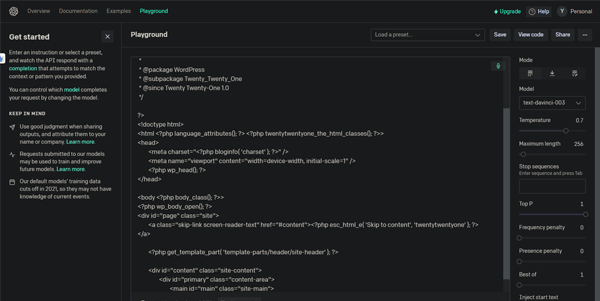
Integrating artificial intelligence into applications requires a robust space to test model responses, adjust parameters, and compare completions. The OpenAI Playground acts as a web-based console for developers to experiment with OpenAI’s API models in real time.
Quick Answer
OpenAI Playground is a developer console and testing environment designed for software engineers, prompt writers, and product builders. It is ideal for users who want to experiment with GPT model outputs, configure system instructions, and adjust parameters like temperature and top-p. The primary use case is API prototyping, with the key advantage of offering direct code exports and interface presets to build custom chatbots instantly.
Table of Contents
Full Introduction to OpenAI Playground
While the standard ChatGPT app provides a simple chat interface for consumers, developers require a console to fine-tune model parameters for software integrations. The OpenAI Playground solves this by giving users direct access to the raw API variables.
Through the Playground interface, users can test older and newer GPT models, test system level prompts, and view the API tokens consumed. It is a vital asset in our list of AI developer tools and LLM models, acting as the starting point for AI application development.
This tool also fits well in our top AI trends categories.
How Does it Work?
The OpenAI Playground links directly to OpenAI’s server infrastructure. When a user selects a model and types a prompt, the request is sent with your custom parameters (such as temperature or frequency penalty) to the API endpoints.
The system runs the model in different modes (like Chat, Assistants, or Legacy Complete) to test different execution workflows. The visual logs display the generated text, showing exactly how adjustments to the sliders alter the creativity and vocabulary of the output.
Key Features
- Mode Selection: Toggle between Chat, Assistants, and Complete interfaces to match your target app workflow.
- Parameter Sliders: Fine-tune temperature (randomness), maximum length, top-p, and presence penalties.
- System Instructions Panel: Write background guidelines that define the AI chatbot’s personality and rules.
- Code Export: Copy the formatted Python, NodeJS, or JSON curl code matching your active session.
- Token Tracking: View live metrics showing the number of input and output tokens consumed by your query.
Pros and Cons
Advantages
- Complete Parameter Control: Adjust the sliders to get highly specific or creative model completions.
- Fast Prototyping: Write and test system instructions without writing database or server code.
- Direct Code Export: Copy working code blocks to speed up software deployment.
Disadvantages
- Requires Credits: Unlike the free ChatGPT, using the Playground consumes paid API credits.
- Technical UI: The density of options and terminology can be confusing for non-developers.
Use Cases
Chatbot Prompt Tuning
Product owners can test system instructions (e.g., “Act as a customer support representative for a bank”) to ensure the AI stays polite and factual.
API Code Prototyping
Software developers can structure their JSON payloads, verify that the responses match the expected format, and export the code to their development builds.
Step-by-Step Tutorial
- Open Platform: Log in to the OpenAI Developer Platform and click “Playground.”
- Choose a Mode: Select “Chat” from the top dropdown menu.
- Choose a Model: Select a model (e.g., `gpt-4o`) from the model dropdown list.
- Write System Prompt: In the left pane, write rules for how the AI should behave.
- Adjust Temperature: Set the temperature slider (lower values for factual answers, higher for creative).
- Run and Export: Click “Submit” to test the chat, and click “View Code” to copy the implementation code.
Pricing and API Costs
Using the Playground consumes API tokens billed directly to your developer account:
| Model | Input (per million tokens) | Output (per million tokens) |
|---|---|---|
| gpt-4o-mini | $0.150 | $0.600 |
| gpt-4o | $5.000 | $15.000 |
Price details may change over time. It is highly recommended to check the official OpenAI pricing page for latest updates.
Comparison with Competitors
| Feature | OpenAI Playground | Anthropic Workbench | Google Vertex AI Studio |
|---|---|---|---|
| Model Library | OpenAI Models Only | Anthropic Claude Only | Gemini & Open Models |
| Mode Options | Chat, Assistants, Complete | Chat, Prompt Editor | Chat, Vision, Speech |
| Code Export | Yes (Python, Node, Curl) | Yes (Python, Curl) | Yes (Python, Node, Go) |
Who Should Use the Playground?
Who Should Use It?
It is perfect for software developers building AI apps, prompt engineers optimizing instructions, and technical writers testing LLM completions.
Who Shouldn’t Use It?
Casual users looking for a free, simple chatbot assistant to write email drafts or plan dinner recipes should stick to ChatGPT.
Best Alternatives
- Anthropic Console Workbench: The official developer console for testing Claude models.
- Google Vertex AI Studio: A comprehensive platform on GCP to test Gemini models and custom weights.
- Vercel AI SDK Playground: A third-party developer playground that allows side-by-side model testing.
Frequently Asked Questions
Is the OpenAI Playground free?
No, using the Playground consumes credits from your OpenAI developer billing account. New accounts may receive temporary trial credits.
What is Temperature in the Playground?
Temperature controls output randomness. Lower values (like 0.1) yield factual, predictable text; higher values (like 0.9) result in creative text.
Can I upload files to the Playground?
Yes, in the Assistants mode, you can upload reference files (like CSVs or PDFs) for the model to analyze using code interpreter tools.
What is the System Prompt?
The system prompt sets the primary instructions and rules that dictate how the AI should behave throughout the chat session.
Can I export my prompts as API code?
Yes, clicking the “View Code” button opens a pop-up with code templates in Python, NodeJS, and cURL matching your active settings.
Does it support voice inputs?
The Playground dashboard is text and image-centric; live voice conversation is primarily supported in the consumer mobile ChatGPT applications.
What is Top P?
Top P is an alternative way to control randomness. A value of 0.1 means the model only considers the top 10% probability words for selection.
Can I share my Playground configurations?
Yes, you can save your active workspace presets and share them with other members of your developer organization.