

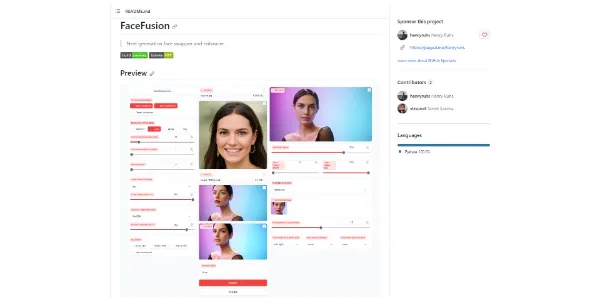
Modifying facial assets in digital media is no longer limited to high-budget visual effects studios. FaceFusion represents the cutting edge of open-source face swapping, letting developers and creators swap and enhance faces in both images and videos with pixel-perfect accuracy.
Quick Answer
FaceFusion is an open-source, next-generation face swapper and image/video enhancer. It is designed for creative developers, digital artists, and video editors who need highly customizable deepfake and face-swap capabilities. The primary use case is swapping and enhancing faces in video files, with the main advantage of offering multiple rendering threads and face enhancers for realistic, high-resolution outputs.
Table of Contents
Full Introduction to FaceFusion
As deep learning models progressed, early face-swapping software suffered from slow processing times and blurry results. FaceFusion solves these issues by using a unified framework that combines state-of-the-art face detection, swapping, and enhancement models.
By leveraging GPU acceleration, FaceFusion processes high-resolution video frames rapidly. Because it is highly extendable, creators can swap multiple faces, enhance the resolution of the swapped face, and adjust alignment parameters manually. It is one of the most powerful utilities in our category of best AI face swap tools, setting a new standard for open-source media modification.
How Does FaceFusion Work?
FaceFusion operates by analyzing the source image (the face to insert) and the target media (the image or video where the face will be placed). The software uses face detection models (like RetinaFace or YOLO) to identify and track face coordinates in every frame.
Next, the face swapping model maps the facial features of the source onto the target. To make the output look natural, FaceFusion applies post-processing face enhancers (like GPEN or GFPGAN) and frame color aligners, blending the lighting and skin textures seamlessly.
Key Features
- Image and Video Swapping: Swap faces in static photos and complex video files with consistent tracking.
- Face Enhancers: Apply AI-driven facial restoration models to output sharp, high-resolution faces.
- Frame Enhancers: Improve the overall video quality using built-in super-resolution models.
- Multi-Face Detection: Select and swap specific faces in a group photo or modify all faces simultaneously.
- GPU Acceleration: Supports CUDA, ROCm, and CoreML to speed up processing times on modern graphics cards.
Pros and Cons
Advantages
- 100% Free: Open-source project with no payload limits or subscription fees.
- No Cloud Uploads: Run the software locally to maintain complete ownership of your media assets.
- Outstanding Quality: The built-in face restorers produce some of the cleanest results in the industry.
Disadvantages
- High Hardware Requirements: Processing high-resolution video requires a dedicated GPU with high VRAM.
- Technical Installation: Setting up Python environments, CUDA, and Git can be difficult for non-technical users.
Use Cases
Video Production and Dubbing
Film studios can align facial movements with translated dialogue tracks, or swap actor faces for stunt doubles in action scenes.
Digital Art and Cosplay Concepts
Digital artists and cosplayers can visualize how different character designs or makeup styles would look on their own faces before production.
Step-by-Step Tutorial
- Install FaceFusion: Clone the repository from GitHub and install the Python dependencies.
- Launch the UI: Run the execution command to launch the Gradio web interface in your browser.
- Upload Source Face: Drop the photo containing the face you want to use into the “Source” slot.
- Upload Target Media: Drag your target video or image into the “Target” slot.
- Select Processors: Enable `face_swapper` and `face_enhancer` for the best output quality.
- Start Processing: Click “Start” and wait for the software to render the output video.
Pricing and Deployment
FaceFusion is open-source and free, meaning deployment costs depend purely on your hardware choice:
| Hosting Option | Pricing | Features |
|---|---|---|
| Local Deployment | Free ($0) | Unlimited runs, utilizes your local GPU, 100% private data. |
| Cloud GPUs (e.g., RunPod) | Pay-per-hour (~$0.20 – $0.80/hr) | Run FaceFusion in the cloud using high-end GPUs without local hardware. |
Price details may change over time. It is highly recommended to check the official repository for latest updates.
Comparison with Competitors
| Feature | FaceFusion | Roop | DeepFaceLab |
|---|---|---|---|
| Ease of Use | Moderate (WebUI) | Easy (Simple UI) | Difficult (Command line) |
| Output Quality | Very High (Built-in Enhancers) | Moderate | Outstanding (Requires training) |
| Model Training Required | No (Instant Swap) | No | Yes (Hours/Days of training) |
Who Should Use FaceFusion?
Who Should Use It?
FaceFusion is ideal for video editors, AI artists, developers looking to integrate face swapping into their apps, and solo content creators with modern GPU hardware.
Who Shouldn’t Use It?
Casual users without dedicated GPU setups, or anyone looking for a simple one-click mobile app without terminal installation, should use other platforms.
Best FaceFusion Alternatives
- Roop: A lightweight, older face swapper that laid the foundation for FaceFusion.
- DeepFaceLab: The industry standard for movie-quality deepfakes, though it requires extensive model training.
- Remaker AI: A cloud-hosted, paid web alternative for quick face swaps.
This tool also fits well in our video editing categories.
Frequently Asked Questions
Can FaceFusion run on CPU?
Yes, FaceFusion can run on CPU, but video processing times will be extremely slow. A dedicated GPU is highly recommended.
What is GPEN and GFPGAN?
These are facial restoration models that FaceFusion uses to sharpen low-resolution faces, making the final swap look crisp and realistic.
Is FaceFusion safe to use?
Yes, running the software locally is safe since your files are not uploaded to third-party servers. Users should ensure they download the code from the official GitHub repository.
Does FaceFusion support multi-face swapping?
Yes, you can target specific faces in target media by selecting the face index or swap all detected faces in a single run.
Can I run it on Mac?
Yes, FaceFusion supports Apple Silicon (M1/M2/M3) using CoreML acceleration, though NVIDIA GPUs remain the fastest option.
Does it support live camera swapping?
Yes, some developer branches of FaceFusion include webcam streaming, allowing real-time face swapping during video calls.
Are there templates for installation?
Yes, the developers provide official installation scripts for Windows, Linux, and macOS in their documentation.
Can I use FaceFusion commercially?
While the FaceFusion codebase is open-source, the underlying pre-trained models (like InsightFace) may have non-commercial restrictions. Check each model’s terms before commercial use.