

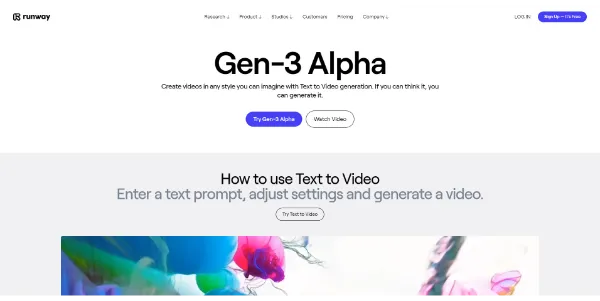
Creating cinematic video assets has typically required expensive camera gear, actors, and weeks of rendering. Runway Gen-3 Alpha represents a massive leap in generative AI video, producing high-fidelity clips with complex camera movements and physics from simple text prompts.
Quick Answer
Runway Gen-3 Alpha is an advanced AI video generation model developed by Runway ML. It is designed for filmmakers, advertising agencies, and digital content creators who want to generate high-resolution video clips from text or images. The primary use case is text-to-video and image-to-video rendering, with the key advantage of offering precise temporal control and highly realistic physics and lighting.
Table of Contents
Full Introduction to Runway Gen-3
Runway has been at the forefront of AI-assisted video editing since the release of Gen-1 and Gen-2. The launch of Gen-3 Alpha represents a complete rebuild of their video generation engine, focusing on temporal consistency and photorealism.
Gen-3 can render dramatic lighting shifts, complex actor expressions, and fluid physics simulations. It is a premier tool in our directory of AI text-to-video tools, providing creative directors and indie filmmakers with an automated VFX suite in their browser.
This tool also fits well in our AI image generators categories.
How Does Runway Gen-3 Work?
Runway Gen-3 Alpha is trained on massive datasets of video and image sequences, mapping how light, motion, and structures interact over time. The model uses diffusion techniques to construct video frames sequentially in latent space.
Unlike older video models that suffered from warping and morphing artifacts, Gen-3 maintains structural integrity across the clip. It interprets detailed camera movement commands (such as “crane down, slow pan”) and character actions with high fidelity.
Key Features
- Text-to-Video Generation: Render highly detailed, cinematic clips from descriptive text prompts.
- Image-to-Video: Upload a static starting image and use text to define the motion and action.
- Advanced Camera Control: Specify precise camera motions like dollies, pans, zooms, and crane shots.
- High Fidelity Characters: Excels at generating realistic human expressions, skin textures, and hair movement.
- Speed Control: Alter target frame rates and transition speeds to create slow-motion or fast-paced clips.
Pros and Cons
Advantages
- Unmatched Photorealism: Renders skin textures, reflections, and atmospheric lighting beautifully.
- Consistent Motion: Drastically reduces the morphing and shifting artifacts typical of older AI video tools.
- Creative Freedom: Build complex sci-fi, historical, or abstract scenes without physical locations.
Disadvantages
- Short Clip Limits: Standard generations are limited to 5 or 10-second segments, requiring stitching.
- High Credit Cost: Running high-resolution Gen-3 rendering consumes subscription credits quickly.
Use Cases
Concept Art and Storyboarding
Ad agencies and filmmakers can generate high-fidelity video storyboards to pitch campaign concepts to clients before filming.
Visual Effects (VFX) Assistance
Editors can generate background assets, smoke simulations, or sci-fi elements to composite into live-action video sequences.
This tool also fits well in our top AI trends categories.
Step-by-Step Tutorial
- Open Runway Dashboard: Log in and navigate to the “Gen-3 Alpha” video generation tab.
- Input Your Brief: Type a detailed prompt describing the subject, setting, lighting, and camera movement.
- Choose Input Image (Optional): Upload a starting image if you want to animate a specific design or character.
- Configure Duration: Set your target clip length to either 5 or 10 seconds.
- Generate Video: Click “Generate” and wait for the cloud servers to render the video file.
- Extend or Download: Download the clip as an MP4, or use the editor tools to extend the sequence.
Runway Gen-3 Pricing
Runway operates on a credit-based subscription model, with Gen-3 generations costing more credits than legacy models:
| Plan | Price | Features |
|---|---|---|
| Free Trial | Free ($0) | 125 one-time credits, standard video editor access, legacy models only (Gen-3 requires paid plans). |
| Standard | $15 / user / month | 625 credits per month, access to Gen-3 Alpha, export up to 4K, remove watermarks. |
| Pro | $35 / user / month | 2,250 credits per month, priority rendering queue, advanced camera controls. |
| Unlimited | $95 / user / month | All Pro features, plus unlimited slow generations for Gen-1 and Gen-2. |
Price details may change over time. It is highly recommended to check the official website for latest updates.
Comparison with Competitors
| Feature | Runway Gen-3 Alpha | Luma Dream Machine | Sora (OpenAI) |
|---|---|---|---|
| Physics Realism | Very High | High | Outstanding (Physically modeled) |
| Availability | Publicly Available | Publicly Available | Restricted Access |
| Pricing Model | Paid Subscription | Freemium | Private / Enterprise |
Who Should Use Runway Gen-3?
Who Should Use It?
Gen-3 is perfect for visual effects artists, advertising directors, indie game developers needing cutscenes, and content creators looking for premium video quality.
Who Shouldn’t Use It?
Casual users looking for free, unlimited video generators without paying monthly subscription fees should use basic, lower-resolution tools.
Best Runway Gen-3 Alternatives
- Luma Dream Machine: A fast, high-quality AI video generator offering free and paid tiers.
- Pika 1.0: An AI video tool that excels in cartoon styles, camera controls, and edit-in-video masking.
- Sora: OpenAI’s upcoming video model capable of rendering complex scenes up to 60 seconds long.
Frequently Asked Questions
Is Runway Gen-3 free to use?
No, Gen-3 Alpha is premium and requires an active Standard or Pro subscription. Free trial credits can only be used on older models.
What resolution does Gen-3 output?
Gen-3 renders video files at high definition (720p or 1080p), which can be upscaled using Runway’s built-in AI upscalers.
How long can a Gen-3 video clip be?
You can generate individual clips of either 5 or 10 seconds. You can then use the Extend feature to add 5-second segments to the clip.
Does it support image-to-video?
Yes, Gen-3 Alpha supports uploading a starting reference photo and animating it using descriptive text commands.
Are the generated videos royalty-free?
Yes, any video generated under a paid subscription can be used commercially without royalties.
Can I add audio to the videos?
Yes, Runway includes a basic video editor dashboard where you can upload audio files and sync them to your clips.
How fast does Gen-3 render?
A typical 10-second video clip takes about 1 to 2 minutes to compile on Runway’s cloud GPU servers, depending on your plan’s queue priority.
Can I generate text inside the videos?
Gen-3 has improved text rendering capabilities compared to older models, but complex writing or detailed labels can still experience minor distortions.